








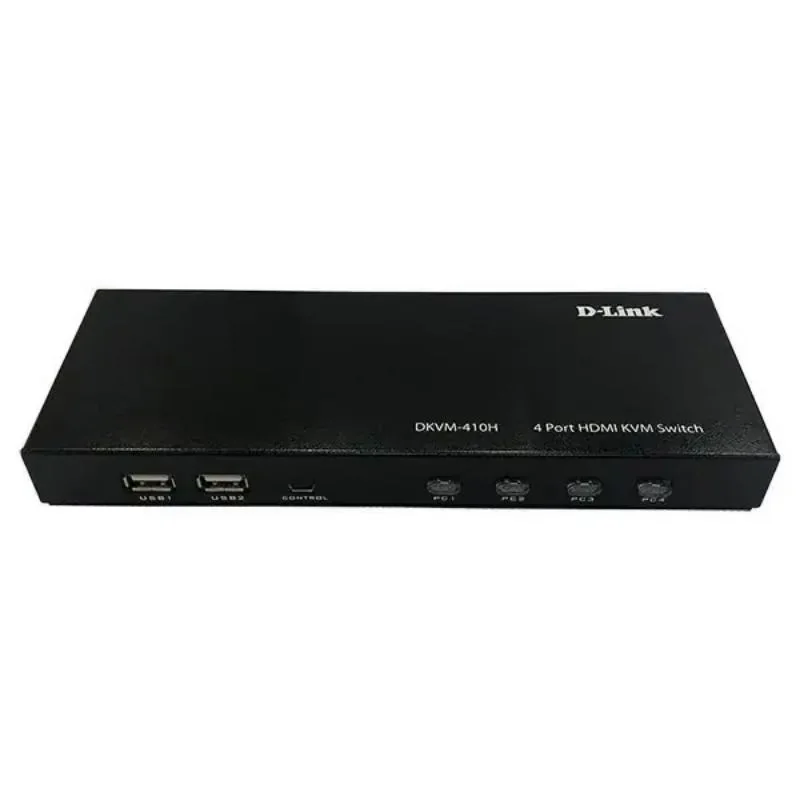
D-Link DKVM-410H 4-Port HDMI KVM Switch allows you to control up to four computers using a single HDMI monitor, keyboard, and mouse. It is designed for users who work with multiple computers and need a convenient way to switch between systems without maintaining separate input devices for each computer.
Featuring four HDMI inputs and four USB Type-B connections for host computers, the DKVM-410H combines video switching and USB peripheral control in one device. Its HDMI 2.0 interface with HDCP 2.2 pass-through supports resolutions up to 4K at 60Hz with 4:2:0 chroma subsampling, making it suitable for compatible displays and computer setups.
The switch provides multiple methods for changing between connected computers, including front-panel buttons, keyboard hotkeys, and the included desktop controller. Its Auto Scan mode automatically cycles between connected computers, while hot-plug support allows computers to be connected or disconnected without shutting them down first.
Two additional USB Type-A ports allow compatible USB peripherals to be shared between connected computers. The device uses a metal enclosure and can operate using power from a connected computer’s USB port. An external power adapter may be required when using power-demanding peripherals through the USB ports; the adapter is not included.
The D-Link DKVM-410H is a practical solution for office workstations, control rooms, technical workspaces, and multi-computer environments where centralized management of several computers is required.
Key Features
- Controls up to four computers using one monitor, keyboard, and mouse
- Four HDMI inputs and four USB Type-B host connections
- Supports resolutions up to 4K@60Hz with 4:2:0 chroma subsampling
- HDMI 2.0 with HDCP 2.2 pass-through
- Switching through front-panel buttons, keyboard hotkeys, or desktop controller
- Auto Scan mode for automatic computer switching
- Two additional USB Type-A ports for peripheral sharing
- Hot-plug support without requiring computers to be shut down
- No driver installation required
- Metal enclosure
- USB-powered during standard operation
Specifications
| Specification | Details |
|---|---|
| Brand | D-Link |
| Model | DKVM-410H |
| Product Type | 4-Port HDMI KVM Switch |
| Maximum Connected Computers | 4 |
| HDMI Version | HDMI 2.0 |
| HDCP Support | HDCP 2.2 pass-through |
| Maximum Resolution | Up to 4096 × 2160 / 3840 × 2160 at 60Hz (4:2:0) |
| Computer Video Connections | 4 × HDMI |
| Computer USB Connections | 4 × USB Type-B |
| Monitor Output | 1 × HDMI |
| Keyboard and Mouse Connections | 2 × USB Type-A |
| Peripheral Sharing Ports | 2 × USB Type-A |
| Desktop Controller Port | Mini-USB Type-B |
| Switching Methods | Front-panel buttons, keyboard hotkeys, desktop controller |
| Auto Scan | Yes |
| Hot-Plug Support | Yes |
| Enclosure Material | Metal |
| Power Supply | USB power from a connected PC; external adapter may be needed for peripherals |
| Dimensions | 210 × 80 × 22mm |
| Operating Temperature | 0°C to 50°C |
| Storage Temperature | -20°C to 60°C |
| Operating Humidity | 0%–80%, non-condensing |
Specifications are based on D-Link’s official technical documentation.
Compatibility
The D-Link DKVM-410H is designed for computers with HDMI video output and compatible USB connections. It supports compatible HDMI monitors and standard USB keyboards, mice, and peripherals.
To connect four computers, each computer requires an HDMI connection and a USB connection to the KVM switch. The monitor connects to the dedicated HDMI output, while the keyboard and mouse connect to the local USB Type-A ports.
The maximum supported video resolution and refresh rate depend on the connected computers, graphics hardware, display, and video settings.
Buyer Use Case
The D-Link DKVM-410H is suitable for buyers who need to:
- Control four computers from one desk using a single monitor, keyboard, and mouse
- Switch between workstations without repeatedly changing cables
- Manage multiple computers in an office or technical workspace
- Share compatible USB peripherals between connected computers
- Use one display for several HDMI-equipped computers
- Monitor connected systems using Auto Scan mode
- Reduce desk clutter in multi-computer environments
Be the first to review “D-Link DKVM-410H 4-Port HDMI KVM Switch”
You must be logged in to post a review.
Related products


Reviews
There are no reviews yet.